
Hand a bundle to an AI agent with your brand kit
For: the same process document, but with the prose written by an agent in your company's voice, for a client or a customer who will read it.
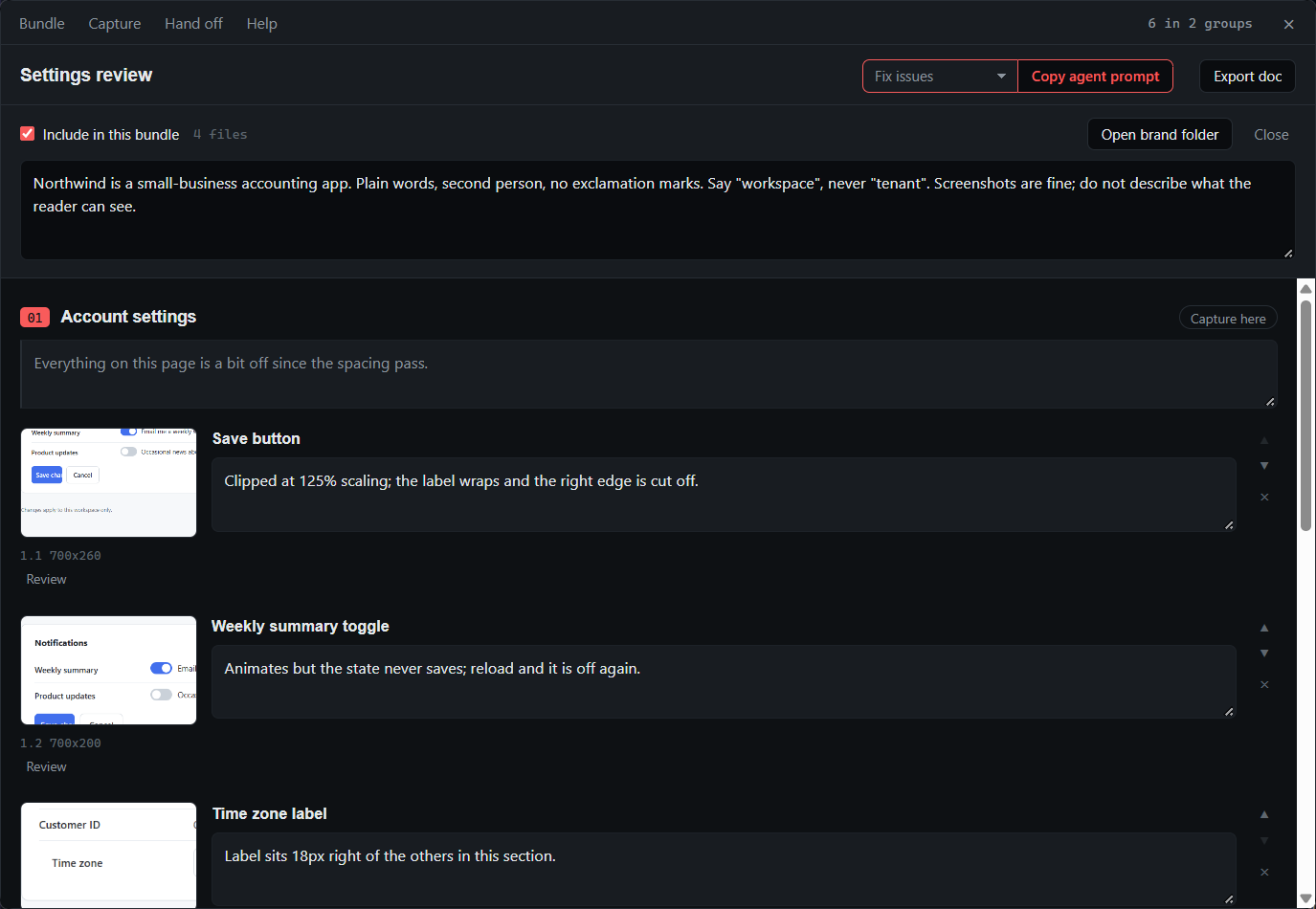
Your notes say what each step does. They do not read like your published docs, and rewriting them takes as long as the captures did. An agent can do the rewrite if it knows the steps, sees the screenshots and knows how you sound. A bundle carries all three.
The flow
- Put your logo, colours and voice notes in
~/QACut/brand/, once. Open Hand off → Brand kit… in the bundle window to write the notes: tone, audience, terminology, things never to say. They are saved asbrand/brand.md. - Capture the process with
Ctrl+Shift+2, or auto-capture it withCtrl+Shift+3, and note the steps. - In the bundle window (
Ctrl+Shift+Q), set the purpose to Write process doc and pick Markdown or a web page. - Press Copy agent prompt. The bundle is written, and an instruction with the folder path filled in is on the clipboard.
- Paste into a CLI agent. For a chat agent that only takes uploads, Save ZIP for chat packages the folder, shows it in Explorer ready to drag in, and copies a prompt that says "the attached ZIP".
What you get
A folder the agent can work from, with your brand kit inside it. The brand folder is copied into the bundle as brand/, so the bundle stays self-contained, and bundle.md gets a Brand kit section near the top with your notes inlined and the files listed. In outline:
# QA bundle: Reset a user's password
## Brand kit
> Second person, short sentences, no exclamation marks.
> Say "workspace", never "tenant".
brand/logo.png, brand/colours.md, brand/brand.md
## 1. Admin console
> Everything here is done as an owner.
### 1.1 Users list

Open Users from the left rail.The built-in prompt tells the agent to match the kit. The agent reads bundle.md, opens the images in order, and writes the document your notes describe, as Markdown or as one self-contained web page.
Tips
- The prompt is yours to edit. Duplicate as mine on the Write process doc prompt in the Prompt library is the quickest way to start a bundle prompt of your own; it then appears by name in the purpose menu, and the choice is saved with the bundle.
{location}in a prompt becomes the folder path for a CLI agent, or "the attached ZIP" for a chat hand-off, so one prompt serves both.- Untick Include in this bundle in the Brand kit panel for a bundle where the brand does not apply.
- A good
brand.mdis short and concrete: who you are and who reads what you write, voice rules as bullets, words to use and avoid, and how a process document should be shaped.
Related
- Organize screenshots into a document and export it, when your own notes are the document and no agent is needed.
- Auto-capture a process into step-by-step screenshots, the fastest way to build the bundle the agent writes from.
- Build a task list of UI fixes for an AI agent, the other built-in purpose.
- Brand a screen recording with your logo and title: the same brand folder, on a video.
- Bundles for agents and Brand kit in the docs.