
Brands
A brand is a folder under ~/QACut/brands/ and a window to manage it. Brands… in the tray opens the window; so does Brands… in the bundle window's Brand kit panel. One brand is active at a time, and that is the one bundles, exports and the studio use. Keep one per client, or one for each product.
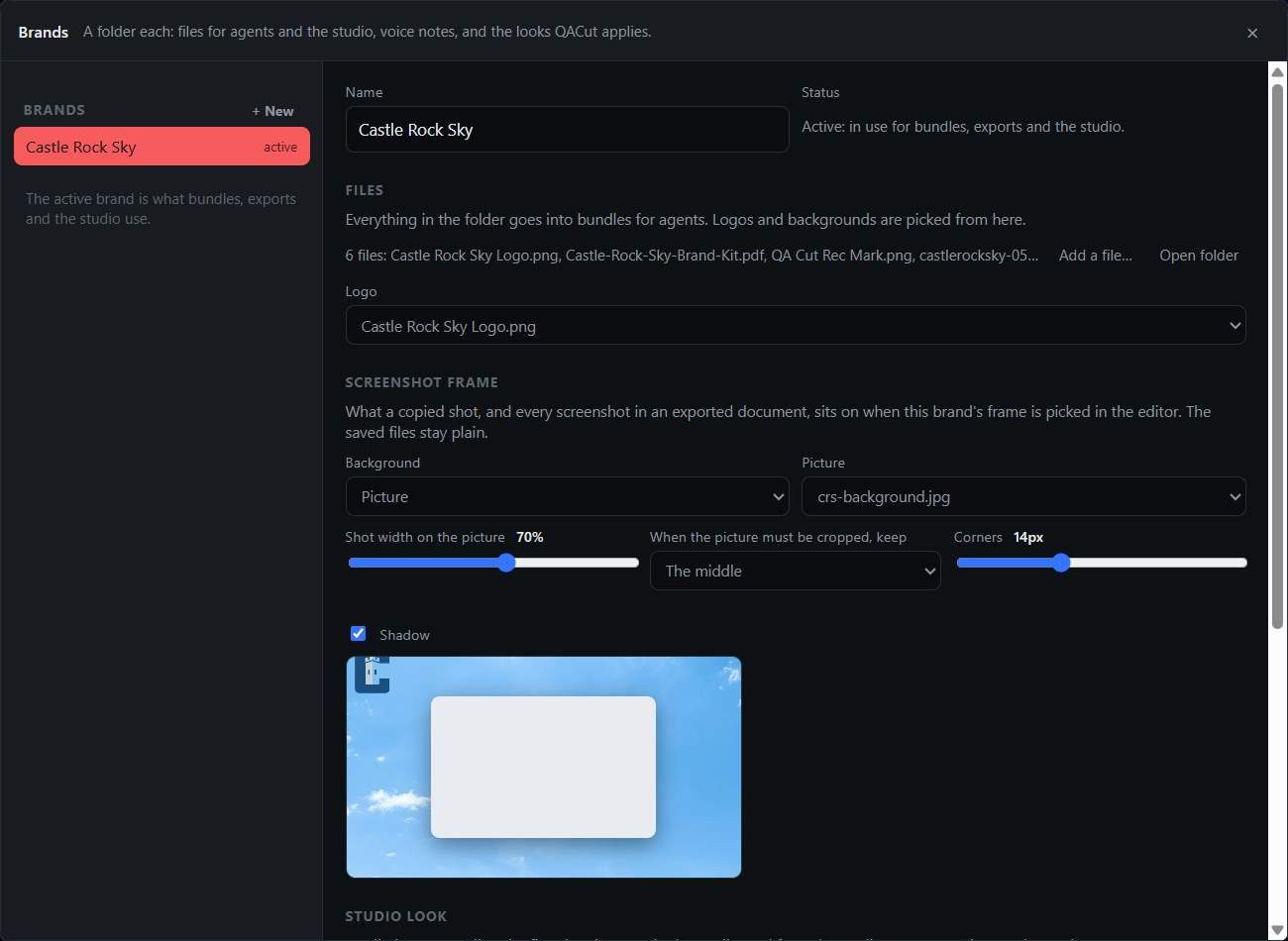
What a brand holds
- Files. Anything you drop in the folder: logos, backgrounds, a style guide PDF, fonts. Every file goes into a bundle for an agent, and pictures are offered wherever QACut asks for one. Add a file… copies a file in; Open folder shows it in Explorer.
- A logo, chosen from the pictures in the folder. The studio puts it in a corner of the video, and the exported document puts it at the top.
- Voice notes, saved as
brand.mdand inlined into every bundle: tone, audience, words to use and avoid, how the business refers to itself. See A good brand.md. - A screenshot frame and a studio look, below.
The screenshot frame
What a copied quick shot, and every screenshot in an exported document, sits on when the brand's frame is picked in the editor's toolbar (the Frame select lists every brand and the plain gradients). A gradient pads the shot with rounded corners and a shadow. A picture keeps its own shape and the shot is placed on it at the width you set, so a logo in the picture's corner stays in the corner whatever the screenshot's size; when a tall shot forces a crop, you choose which part of the picture to keep. The note you typed is printed in the space below the shot. Files on disk are never framed, so an agent never gets padding.
A backdrop image wants to be at least 1600 pixels wide, in the video's proportions if it is also the studio look, with anything important kept away from the middle, where the shot goes.
The studio look
Background (a gradient or a picture), padding, corners, shadow, and where the logo sits and how big. A recording takes the active brand's look the first time it opens in the studio; Use brand look in the studio's Frame section applies it again after you have changed things.
In bundles
Hand off → Brand kit… in the bundle window shows the active brand, lets you switch the include toggle for this bundle, and opens the Brands window. When the brand is included, its folder is copied into the bundle as brand/ and the notes are inlined into bundle.md, so an agent writing a document or a fix matches the brand without being told.
A good brand.md
Short and concrete beats long and aspirational. What works:
- Who reads what you write, and what they know.
- Voice in five lines: person, register, sentence length, what to avoid.
- Words to use and words to avoid, as two lists.
- How a document should be shaped: title, when, steps, what to see, where to get help.
- Colours and type, as a table with hex values, and what each is for.
- Logo rules: file name, clear space, minimum size, backgrounds it may sit on.
Write it once; every bundle carries it.